Connect your Nuxt site via the GitHub App
The fastest way to connect a Nuxt Content site to 42flows. You install our GitHub App on your repo once; we commit the four files needed to receive content — nothing to copy-paste, no separate npm install, no content.config.ts to write.
What you need before you start
- A Nuxt 3 project on GitHub (a fresh
nuxi initworks too) - Admin rights on the repo
- Hosting that redeploys on push (Coolify, Vercel, Netlify — anything that watches your default branch)
Step 1 — Fill the form and install the GitHub App
Go to Dashboard → Sites → Connect a Site, pick Nuxt Content (via GitHub) as the platform, and click Install GitHub App. GitHub takes you to a page where you grant access to the repo(s) you want to connect. After you return, the form looks like this:
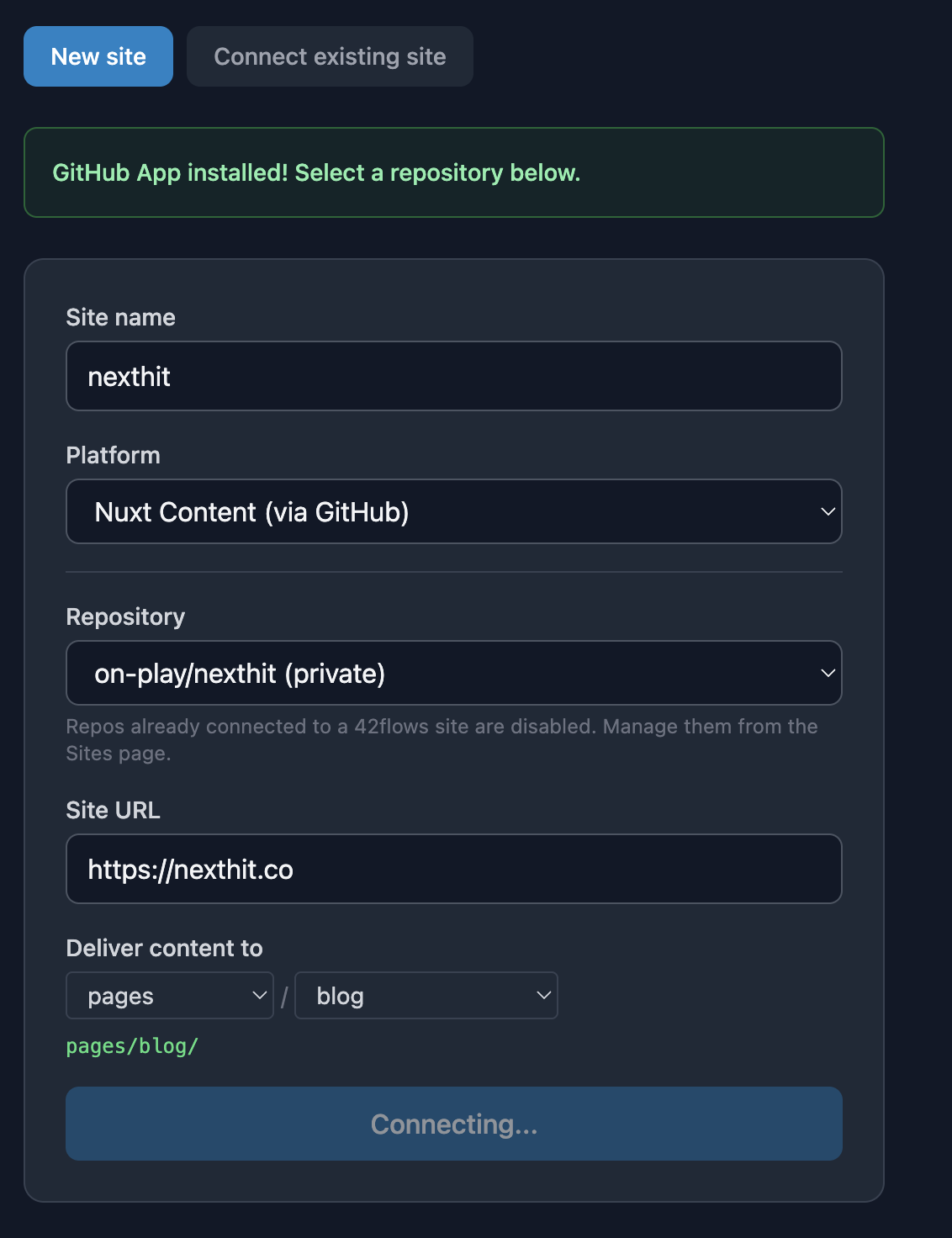
A few notes on the fields:
- Repository — shows every repo the GitHub App has access to. Repos already connected to another 42flows site are disabled so you can't accidentally double-connect.
- Site URL — the live URL of your deployed site. Used to construct canonical links.
- Deliver content to — the directory inside your repo where we'll commit
.mdfiles. Default iscontent/blog/. You can pick any sub-folder.
Click Connect & test to fire the install.
Step 2 — Confirmation panel
Within a few seconds, you'll see a confirmation of exactly what 42flows pushed to your repo:
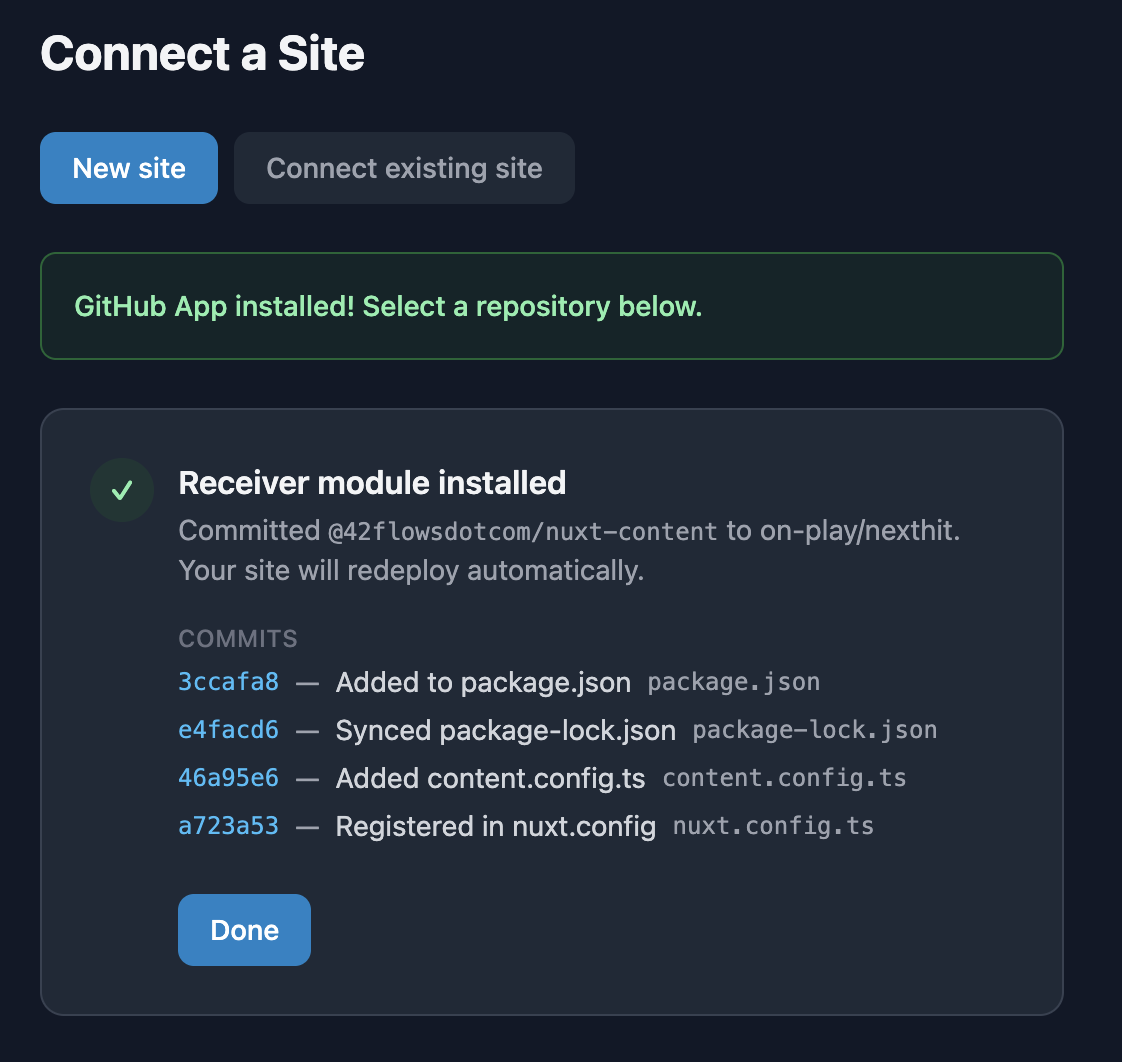
Four commits land on your default branch:
| Commit | File | Why |
|---|---|---|
Added to package.json | package.json | Adds @42flowsdotcom/nuxt-content and @nuxt/content (if not already present) |
Synced package-lock.json | package-lock.json | Keeps your lockfile in sync so npm ci builds don't fail. npm only; pnpm/yarn users get a warning to regenerate manually |
Added content.config.ts | content.config.ts | Starter file declaring a blog collection for Nuxt Content v3 (only committed if you don't already have one) |
Registered in nuxt.config | nuxt.config.ts | Adds @42flowsdotcom/nuxt-content to your modules[] array |
Each commit SHA links to GitHub so you can inspect the diff.
Step 3 — Your hosting redeploys
Your push-to-deploy setup picks up the four commits and rebuilds the site. When the new build is live, the /blog/:slug route is ready to receive content — no further action on your side.
What gets delivered
After you connect, every 42flows article pipeline run commits an MDC file to your content/blog/ directory. The file contains YAML frontmatter (title, description, keywords, draft: false by default) and an MDC body using the 7 Vue components shipped by @42flowsdotcom/nuxt-content: HookStatistic, QuickAnswer, SummarizeButtons, Faq, FaqItem, Sources, JsonLd. All are registered globally — no imports needed in your pages.
The module also registers a default /blog/:slug page. If you already have your own pages/blog/[slug].vue, Nuxt's file-based routing gives yours priority — our default stays out of the way.
Edge cases
@nuxt/contentv2 installed — We abort the install with a clear error. v2 → v3 is a breaking migration (different config file format,queryContentrenamed toqueryCollection), and silently bumping would break your build. Upgrade manually, then reconnect.- Existing
content.config.tswithout ablogcollection — We don't modify your config. Instead, you'll see a warning telling you to either add ablogcollection or setflows42.collectionNamein yournuxt.config.tsto match an existing one. - Non-npm repo (pnpm, yarn) — The
package.jsonandnuxt.config.tsstill get committed. You'll see a warning to runpnpm installoryarn installlocally and commit the updated lockfile before your next deploy.
Adding another site
When you come back to connect a second site from the same GitHub org, the repo dropdown marks already-connected repos as "— already connected" and disables them. Pick a different repo and go through the same flow.
Connected a repo and something didn't land? Check the Activity tab on the site's dashboard page — the zero-touch install is logged as a receiver.installed event with the commit SHAs and any warnings. Or reach out at [email protected].